
An AI personal trainer, in your pocket
Train like your sport
actually wants.
Most training apps hand every athlete the same program. Dialed is a real AI coach on your phone — it builds your week around the sport you play, the position you play, and the week you're actually having, then tracks your lifts and recovery over time and tells you why something's working or why it's stalled.
7-day free trial · Cancel any time
Getting started
How it works
Two minutes of setup, then a check-in each morning.
01
Tell it who you are
Sport, position, experience level, goals, and when your season or next competition lands. Takes a couple of minutes, once.
02
Check in each morning
Sleep, soreness, and stress on a quick slider. That's the input that decides how hard today should actually be.
03
Train the plan it builds
A full week, regenerated for you, with exercises, sets, reps, and intent for every day — including which days to back off.
Features
More than a plan. An actual coach.
Six things a downloaded program can't do.
Built for your sport and position
A defensive lineman and a distance runner shouldn't run the same program. Dialed generates a plan for the athlete you actually are — not a generic split with your sport's name on it.
Adapts to your real week
Four hours of sleep, three tests Thursday, legs wrecked from Tuesday's practice. A daily check-in scales that day's volume and intensity to what your body can actually absorb.
Peaks when it matters
Set your competition date and Dialed periodizes backward from it. Off-season builds volume, in-season protects your legs, and the week before automatically tapers.
Tracks what's actually moving
Every lift, every rep, charted over 30 days — PRs, plateaus, and exactly when each one happened.
Explains why, not just what
A stalled bench press isn't random. Dialed cross-references it against your actual sleep and soreness trends and tells you which one is the real cause — then grades your whole week (consistency, recovery, discipline) in a real report every Sunday, not a vague pat on the back.
Handles your school load
Connect Canvas and your assignments and exams flow into your training week. Heavy academic stretch? The plan lightens on its own.
The real app
See it for yourself
Every screen below is the actual app, not a mockup.
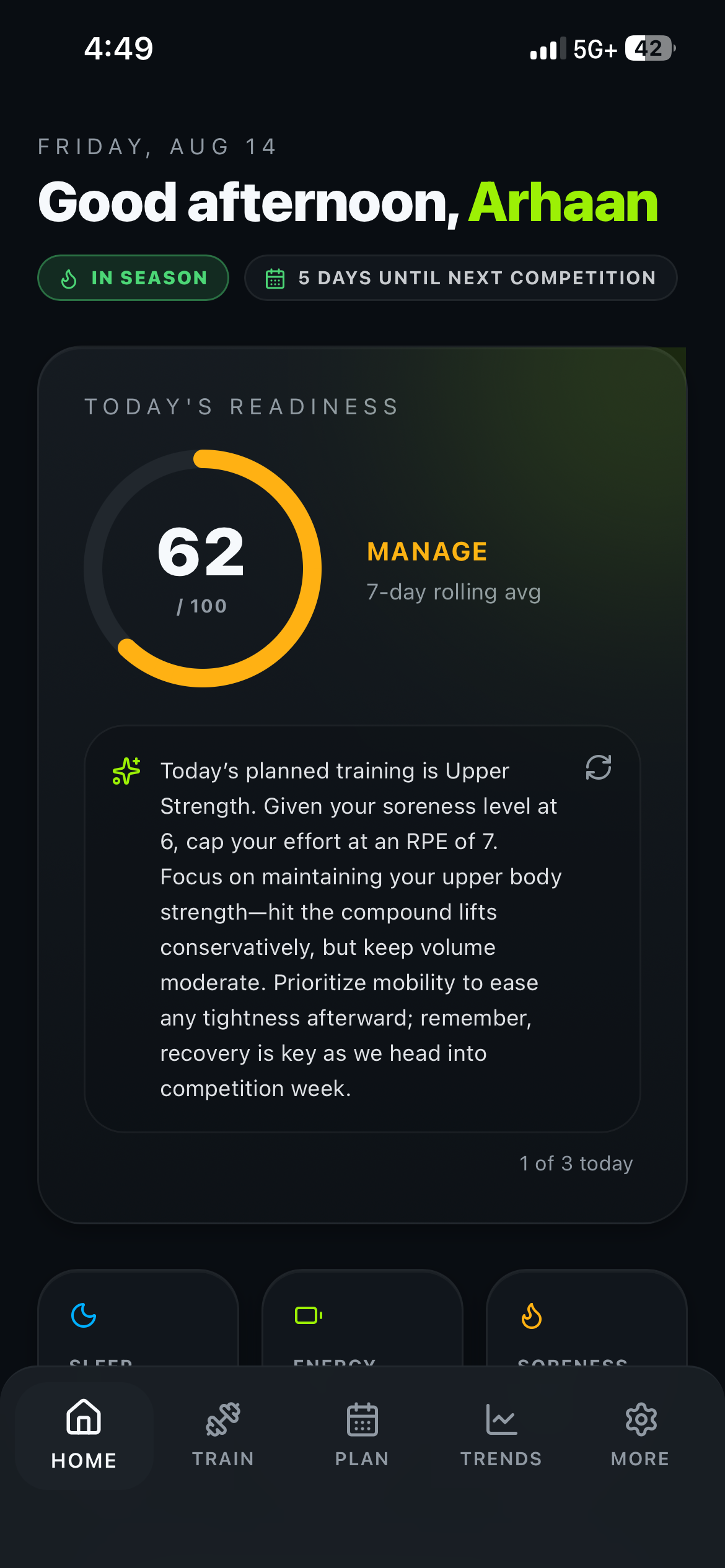
Home
One score, built from your actual data
62/100, MANAGE — a 7-day rolling average of what you've actually logged, not a guess. The note underneath reads soreness at 6/10 and caps today's session at RPE 7 specifically because of it.
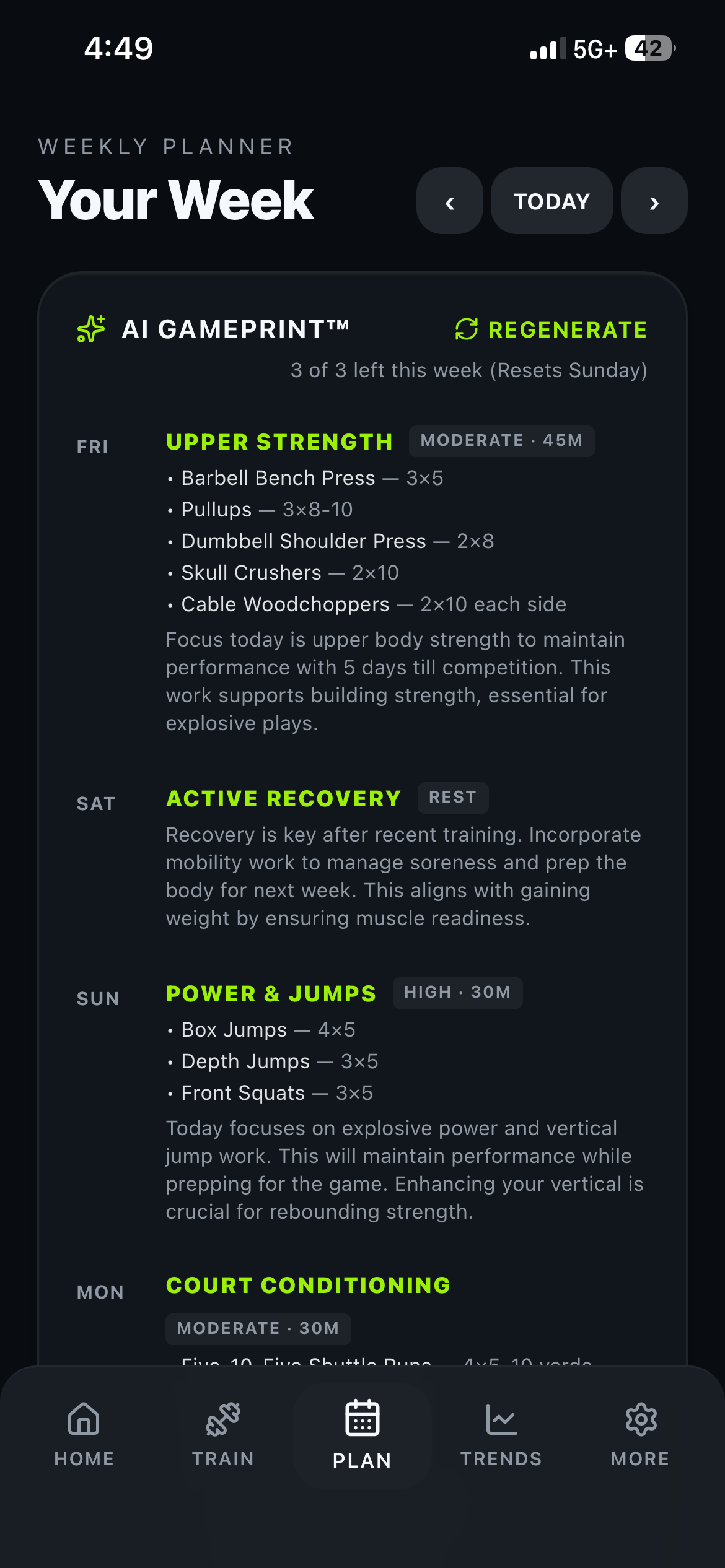
Your week
A real week, not a template
Every day names its exercises, sets, and reps, and explains why: "5 days till competition" is the reason Friday is upper-strength instead of a max lower session. Three regenerations left, resetting Sunday.
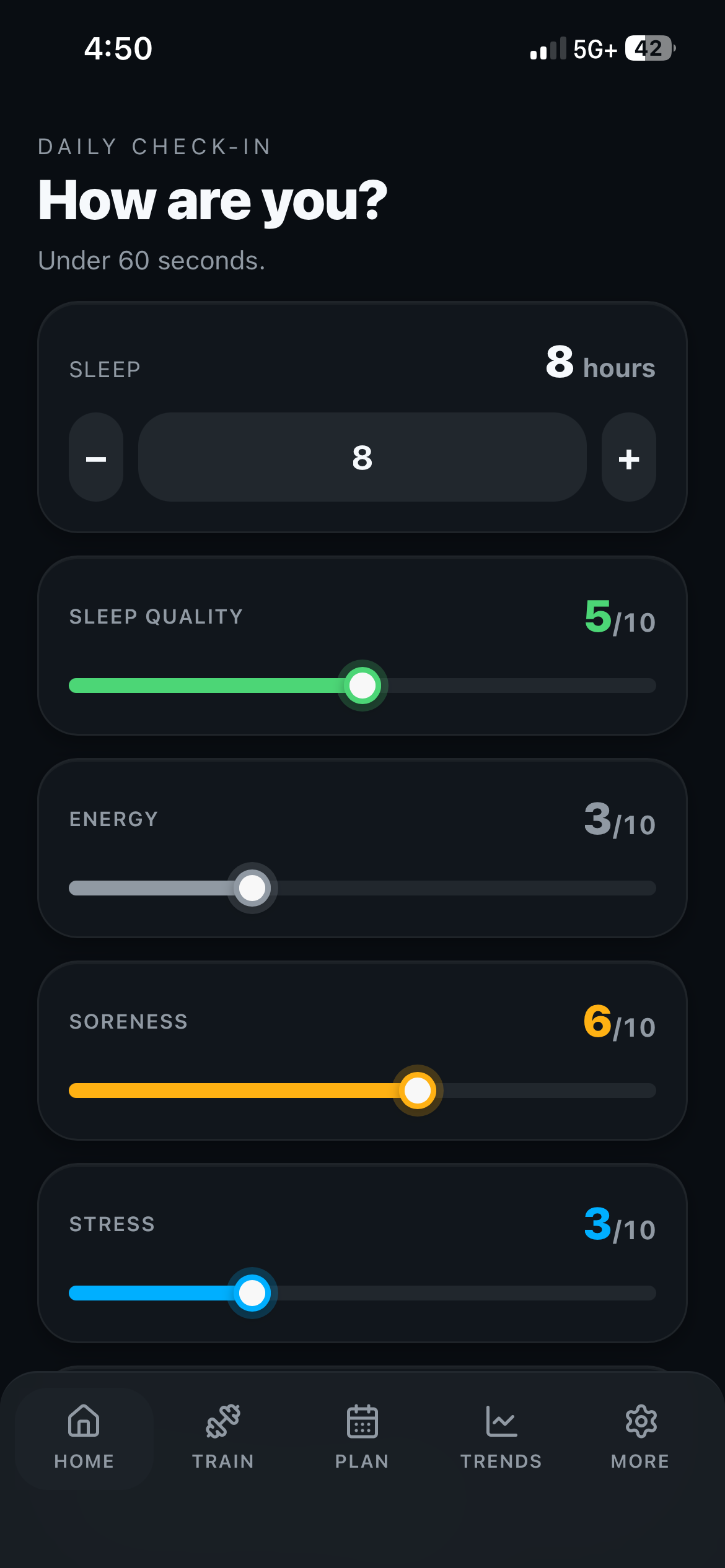
Daily check-in
Under 60 seconds, every morning
Sleep, sleep quality, energy, soreness, stress. Five numbers — and they're the actual input that decided the readiness score and the RPE cap on the Home screen above.
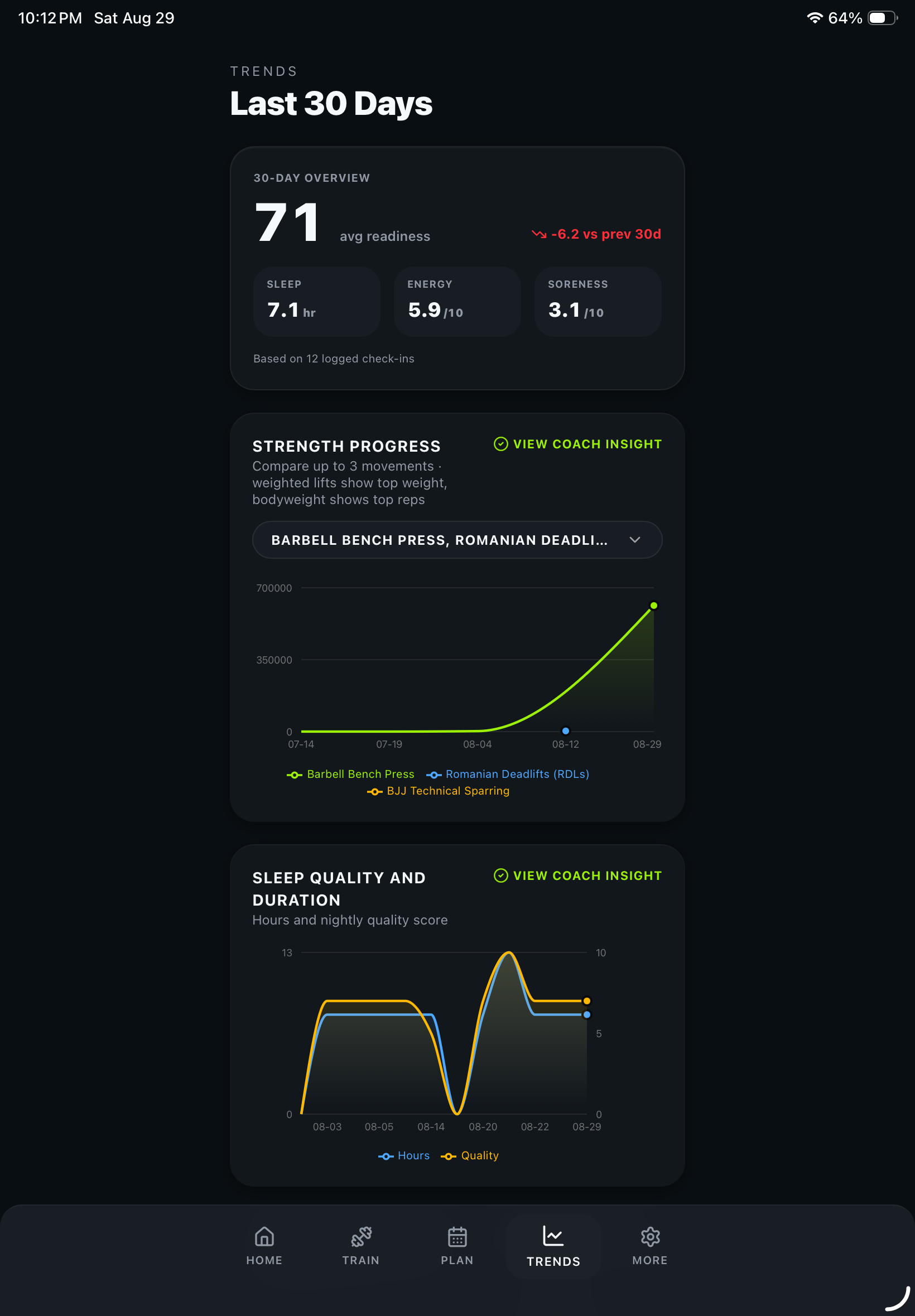
Trends
A trend line, not a data point
30 days of Barbell Bench Press logged next to 30 days of sleep hours and quality — so a plateau shows up next to the recovery data that might actually explain it, not in a separate screen you have to remember to check.
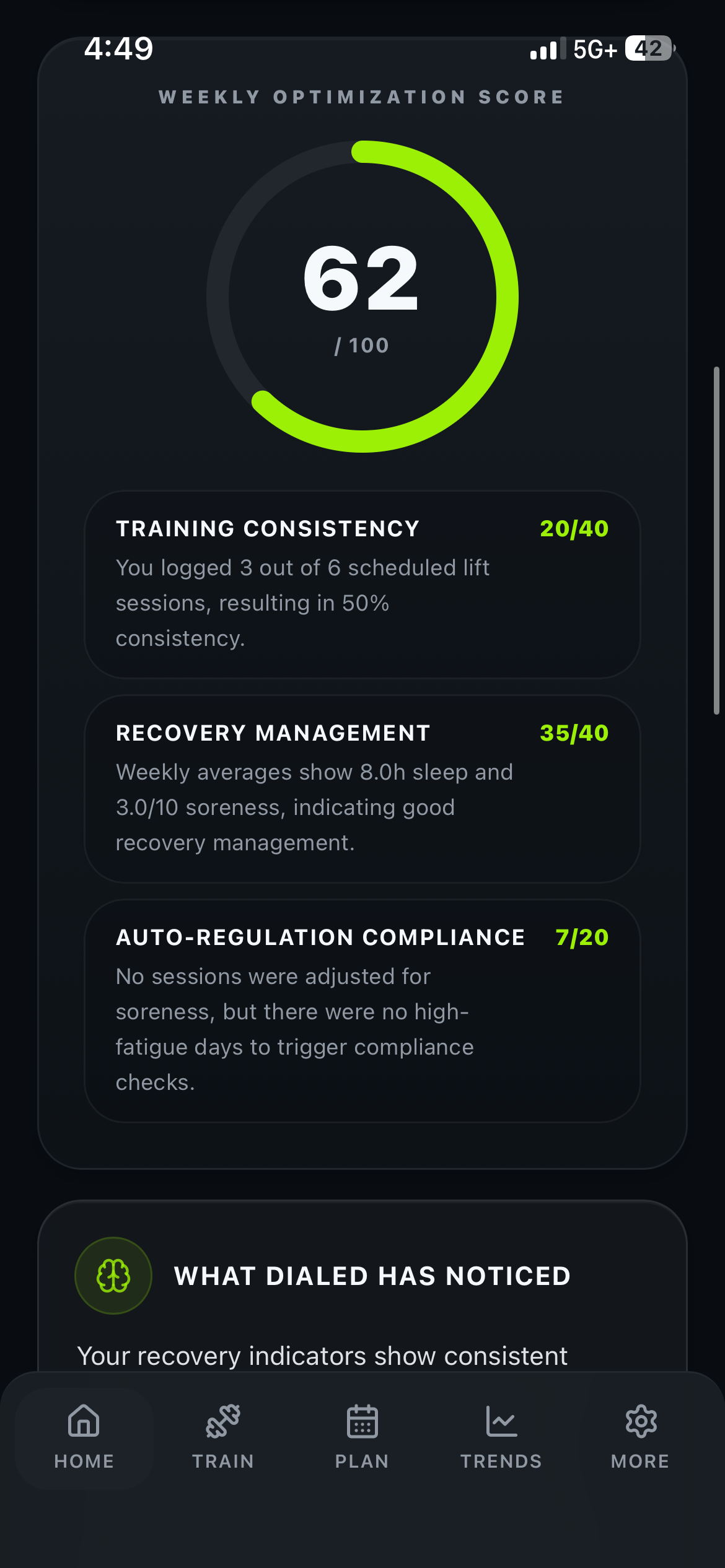
Weekly report
Graded, not just summarized
Training consistency 20/40, recovery management 35/40, auto-regulation compliance 7/20 — each with the actual reasoning underneath it, so "how was my week" has a real, specific answer.
The output
What a week looks like
An example in-season week for a football lineman, four days out from a game. Every day carries a focus, an intent, and a reason.
Mon
Lower — Max Effort
HighHeaviest day of the week, furthest from Friday. Squat, hinge, and unilateral work while your legs can still afford it.
Tue
Upper — Push Volume
ModeratePressing and horizontal pull. Volume stays up here because it costs your legs nothing on game week.
Wed
Recovery + Mobility
LowDeliberately easy. Hips and thoracic spine, light sled or bike — the point is to arrive Thursday fresher, not more tired.
Thu
Speed / CNS Primer
ModerateShort, sharp, low volume. Enough to stay explosive without leaving anything in the tank.
Fri
Game Day
CompeteNo lifting. Everything this week was built backward from today.
Sat
Rest
RestFull day off. Sleep is the session.
Sun
Upper — Pull Focus
ModerateBack and posterior shoulder to rebalance a week of pressing and hitting, and to open the next block.
Illustrative. Your week is generated from your own sport, position, season timing, and check-ins.
The difference
Why a generic program stops working
A downloaded program
- Same plan for every athlete who downloads it
- Written months ago, for nobody in particular
- Doesn't know your season or your game day
- Doesn't care that you slept four hours
- You guess when to back off — usually too late
- One bad week and the whole block gets abandoned
- A stalled lift is just... a stalled lift
Dialed
- Generated for your sport, position, and level
- Rebuilt every week from your actual data
- Periodized backward from your competition date
- Reads your sleep, soreness, and stress daily
- Tapers on its own when the game gets close
- A rough week adjusts instead of ending the block
- Tells you why it stalled — sleep, soreness, or a real plateau
Coverage
Programming for your sport
Position-specific within each one.
Pricing
Start free for 7 days
Cancel any time before it ends and you're not charged.
Annual
Save 58%$49.99/yr
Works out to $4.17/month
Monthly
$9.99/mo
Cancel any time
- Weekly plan regenerated for you
- Daily readiness scoring
- Sport & position programming
- Automatic taper and periodization
- AI insights — why a lift stalled, not just that it did
- Canvas academic load balancing
Subscriptions renew automatically unless cancelled at least 24 hours before the end of the current period. Payment is charged to your Apple ID account at confirmation of purchase. Manage or cancel in your Apple ID settings.
FAQ
Questions
Who is Dialed for?
High school and college athletes who train seriously and are tired of guessing. If you lift to get better at a sport rather than to look a certain way, it's built for you.
Which sports does it support?
Football, basketball, wrestling, soccer, track, baseball, lacrosse, swimming, volleyball, tennis, BJJ, MMA, powerlifting, and golf — plus an "Other" option that still uses your position, goals, and season timing to shape the plan.
How is this different from a generic workout app?
Most apps hand every user the same program and let you tick boxes. Dialed regenerates your week from your sport, position, competition date, and your own check-ins, then analyzes your logged lifts against your sleep and soreness trends to tell you why something's working or stalled — a bad week gets adjusted and explained, not just abandoned.
Does it actually coach me, or just generate workouts?
Both. Building the week is the baseline — the part that makes it feel like a coach is what happens after: it cross-references a stalled lift against your actual sleep and soreness data instead of just plotting a flat line, and grades your whole week (consistency, recovery, discipline) in a real report every Sunday.
Do I need gym equipment?
A normal school or commercial weight room covers everything. Plans are built around standard barbell, dumbbell, and bodyweight movements.
What does the daily check-in actually change?
Volume and intensity for that day. Bad sleep and high soreness pull the session back so you still train without digging a deeper hole; a good day lets it push. Over a week those adjustments are the difference between finishing a block and abandoning it.
What is the Canvas integration?
Optional. Connect your school's Canvas account and upcoming assignments and exams flow into your training week, so a heavy academic stretch automatically lightens your training load. The app works fully without it.
Does it replace my coach?
No. It handles the programming, tracking, and week-to-week adjustment your coach usually doesn't have time to individualize. Your coach still coaches — Dialed makes sure what you do on your own supports that.
What happens the week before a competition?
It tapers automatically. Set your competition date and the plan periodizes backward from it: off-season builds volume, in-season protects your legs, and the final week reduces volume so you show up fresh.
Is my data private?
Your training data is yours, stored against your account and never sold. Plans are generated by sending only your sport, position, experience level, goals, and self-reported check-in numbers — no name, no email, no identifying details.
Can I delete my account?
Yes, from Settings → Delete account, inside the app. It permanently removes your account and all associated training data.
How much does it cost?
$9.99 per month or $49.99 per year, which works out to $4.17 a month. Both start with a 7-day free trial.
What happens after the free trial?
Your subscription begins at the end of the 7 days unless you cancel at least 24 hours before it ends. Cancel before then and you're not charged.
How do I cancel?
Settings → Apple ID → Subscriptions on your iPhone. Apple handles all billing, so cancellation happens there rather than in the app. You keep access through the end of the period you've already paid for.
What devices does it run on?
iPhone, on iOS. Everything syncs to your account, so a new phone just needs you to sign back in.
Help
Support
Something broken, a question about your subscription, or feedback on your programming? Email us and you'll get a real reply.
To cancel a subscription, open Settings → Apple ID → Subscriptions on your iPhone.
Legal
Terms and privacy
The full documents, in plain language.
Terms of Service
What you agree to by using Dialed — including subscription terms, acceptable use, and the limits of training guidance.
Privacy Policy
What we collect, what we never collect, how training data is used, and how to delete your account and everything in it.
Dialed provides training and recovery guidance, not medical advice. Talk to a doctor before starting a new training program, and stop and seek help if something hurts in a way training shouldn't.